
Spiritual Garden
by 21 Day Ministry
Rebuild Your Quiet Time With God in 21 Days.
Join the Spiritual Garden 21-Day Challenge and receive personalized scripture, prayer prompts, peaceful audio, journaling, and daily encouragement designed to help your faith grow.
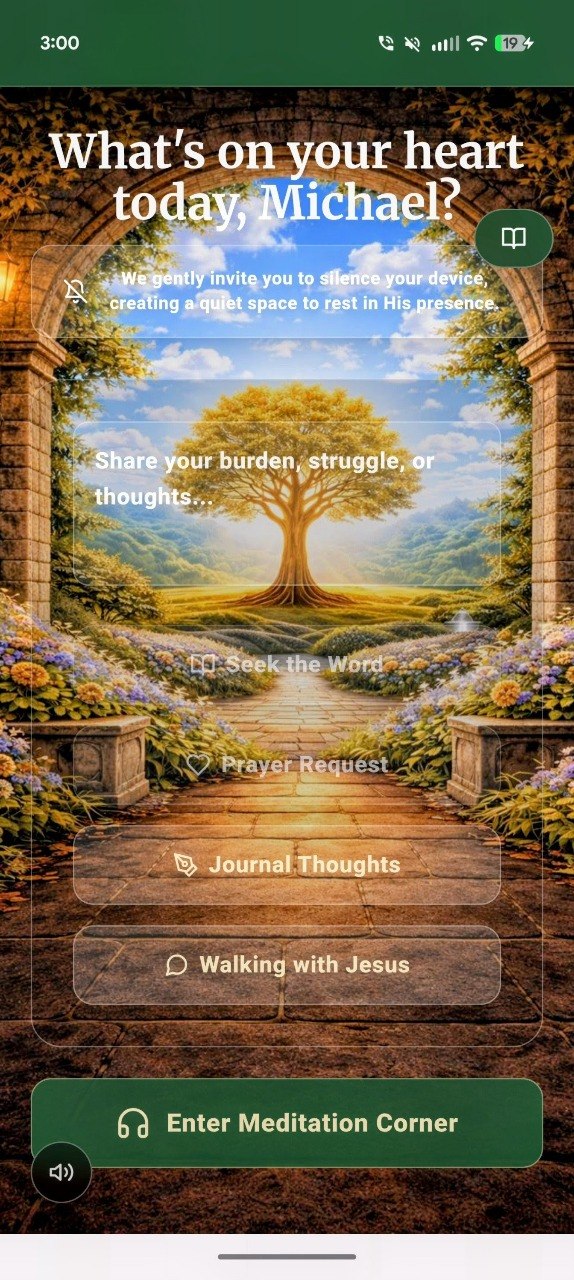
Why Spiritual Garden
What You Get Inside the Garden
Created for believers who want a more personal and consistent devotional life without the noise, clutter, or pressure of modern platforms.
Personalized Devotionals
Receive guided scripture reflections shaped around your current season and spiritual goals.
Prayer Journal
Capture prayers, reflections, and answered moments as you watch your spiritual life bloom.
Peaceful Audio
Listen to each devotional in a calm, soothing format during your commute or quiet time.
Morning Scripture
Wake up to a daily verse delivered straight to your lock screen every morning.
Walking with Jesus
A sacred, continuous chat for deeper guidance and comforting, biblically-rooted counsel.
Who This Is For
Built for the busy, the distracted, and the spiritually hungry.
"Spiritual Garden is not another noisy social app. It is a quiet place to meet God daily."
For the believer who wants consistency.
For the person who feels spiritually distracted.
For the person who wants to pray but doesn't always know what to say.
For the person who wants a quiet space with God away from social media noise.
Early Stories
What Early Believers Are Saying
"I'm loving my app. It's wonderful... I needed the word of God in my life. But don't like to be in large crowds at church. I'm grateful for you thank you 😊"
Early User
"I really needed it this morning and it came through for me."
Early User
"I am so in love with the Spiritual Garden app... Bravo 👏🏾👏🏾👏🏾👏🏾👏🏾"
Early User
How it works
Simple rhythms that help your faith bloom.
Spiritual Garden is designed to feel calm, restorative, and personal from the very first day.
Share your season
Tell the app what you are praying through, hoping for, or needing encouragement in.
Receive your devotional
Get a tailored daily devotional with scripture, reflection, prayer prompts, and encouragement.
Grow one day at a time
Return daily to build a steady habit of intimacy with God and track how He is moving in your life.
Take the Garden With You
Spiritual Garden is a fast, lightweight app you can add directly to your home screen—no app store required.
Apple iOS (Safari)
✓ 1. Tap the Share icon at the bottom
✓ 2. Scroll down to 'Add to Home Screen'
✓ 3. Tap 'Add' in the top right
Android (Chrome)
✓ 1. Tap the 3-dot menu at the top right
✓ 2. Tap 'Install app' or 'Add to Home screen'
✓ 3. Follow the on-screen prompt
Build the habit
Begin your 21-day devotional journey today.
Sign up today for instant access to our free plan, or take advantage of our 7-day trial to unlock additional features on our base or premium plan and discover a more personal, peaceful, and consistent way to spend time with God.